
Overview
USPS Cubic Rates are a discounted pricing option available for Priority Mail and Ground Advantage, designed for small, dense packages. Instead of relying primarily on weight, Cubic Pricing is based on the package’s volume and shipping zone, often resulting in lower costs for heavier items shipped in compact boxes.
USPS Cubic Pricing Eligibility
To qualify for USPS Cubic Pricing, the following requirements must be met:
- Package weight: Up to 20 lbs
- Package volume: Up to 0.50 cubic feet for Priority Mail and 1 cubic foot for Ground Advantage
- Maximum dimension: No single dimension may exceed 18 inches
- Service: USPS Priority Mail or Ground Advantage
- Pricing type: Commercial pricing (Commercial Base or Commercial Plus)
Calculate Cubic Volume
Shipbridge automatically calculates cubic volume when package dimensions are provided. For eligible shipments, USPS calculates shipping costs based on:
- Package size (cubic volume)
- Shipping zone
This pricing model allows you to pay for the space the package occupies rather than its weight, making Cubic Pricing especially cost-effective for dense products.
Formula & Measurement Rules
- Cubic Volume Formula: Length × Width × Height ÷ 1728 = Cubic Feet
- All dimensions must be rounded down to the nearest 0.25 inch
- No dimension may exceed 18 inches
- Total volume must not exceed 0.50 cubic feet for Priority Mail or 1 cubic foot for Ground Advantage
Enable USPS Cubic Rates in Shipbridge
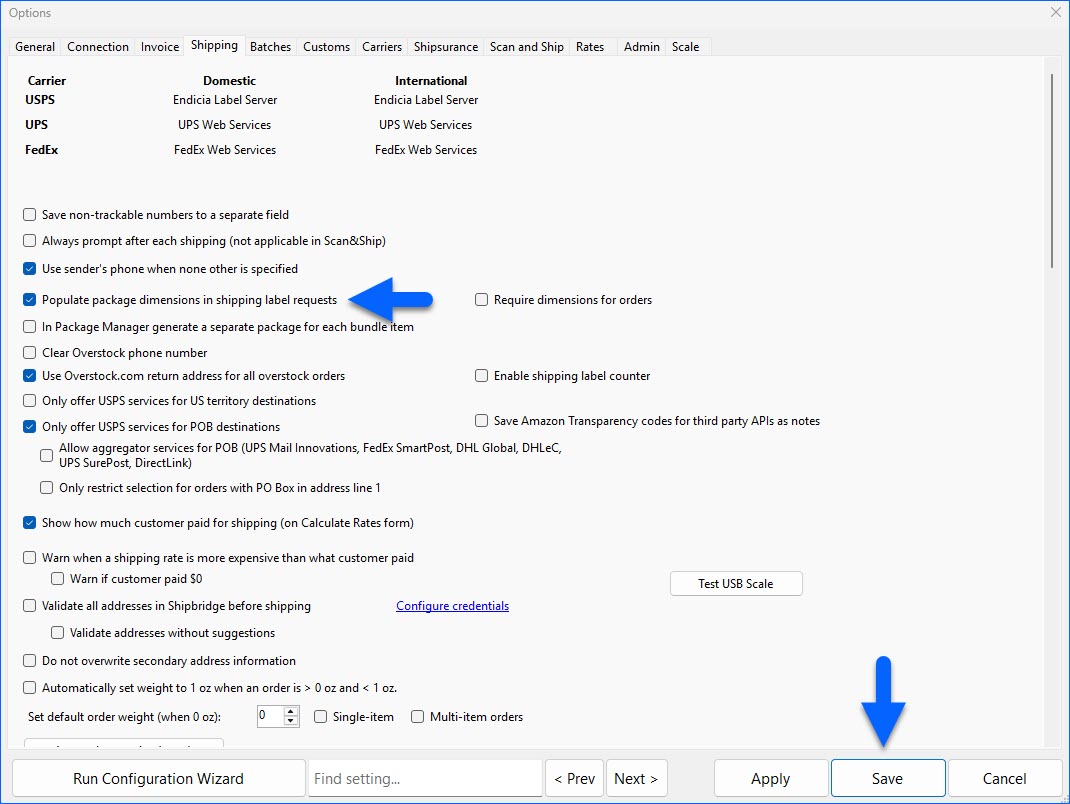
To calculate cubic rates in Shipbridge, package dimensions must be included in your shipping label requests. To do that:
- Go to Menu > Options > Shipping.
- Enable Populate package dimensions in shipping label requests.
- Click Save.
- Next, go to Menu > Customize Interface > Shipping Services and ensure that the relevant cubic services are enabled.
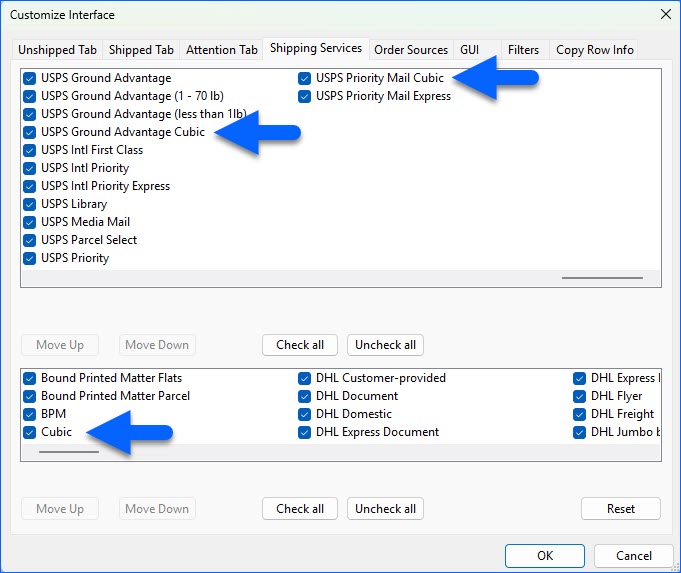
- Click OK.
Once enabled, Shipbridge automatically considers Cubic Pricing eligibility, allowing you to compare standard vs cubic rates in the rate calculator.